

Artists often struggle with light and shadow in their work. The proko value study tool changes that. This free web app helps you break down images into simple values. It makes studying composition easy. Created by Stan Prokopenko, it builds on his teaching experience. In this guide, you will learn everything about it. From basics to advanced uses, get ready to improve your skills.
Proko started as a way to teach drawing online. Stan Prokopenko, the founder, has years in art education. He made videos that millions watch. His site offers courses on anatomy, figure drawing, and more. Among his tools, the proko value study tool stands out. It focuses on values—the lights and darks in art. Values shape how we see forms and moods.
Why does this matter? Good values make art pop. Bad ones make it flat. The tool lets you adjust values on any image. See how light flows. Plan your paintings better. Many artists use it daily. It fits beginners and pros alike.
Understanding Values in Art
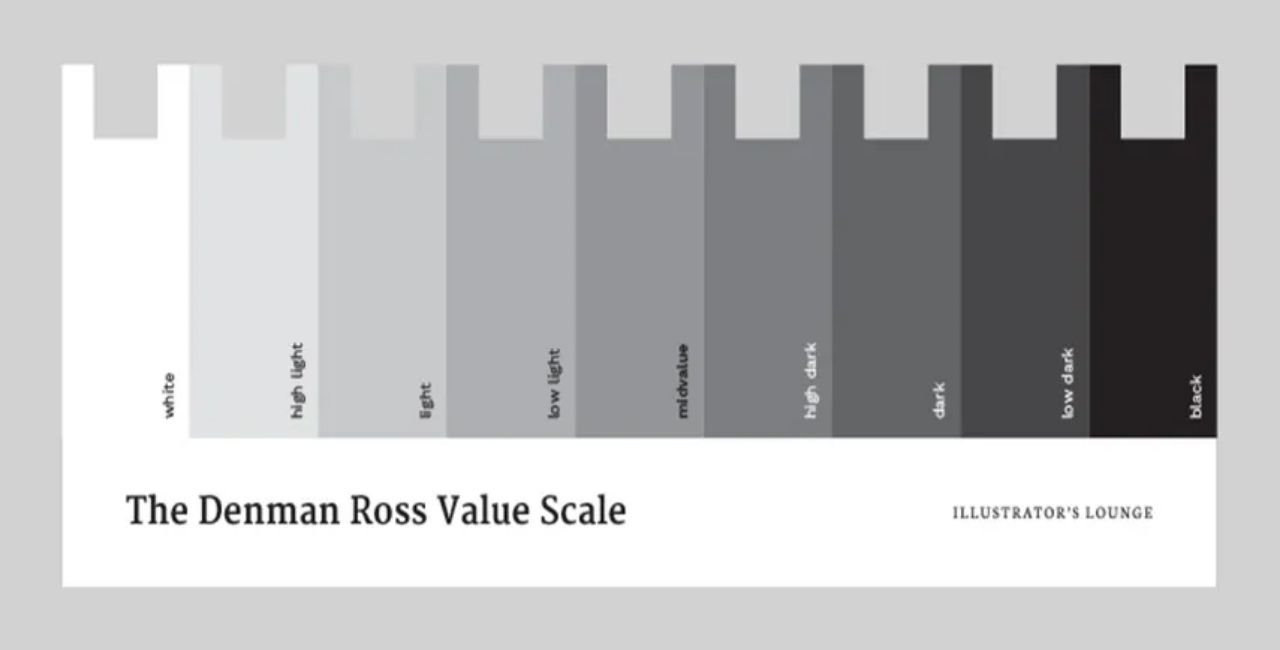
Values refer to the range from light to dark. They create depth and contrast. Without strong values, art lacks impact. Artists like Rembrandt mastered them. Today, digital tools help us learn faster.
Proko’s platform teaches this through fun lessons. Stan explains values in his courses. He shows how to group them for strong designs. The tool brings those ideas to life. Upload a photo, and it simplifies it. You spot key areas right away.
Think of a landscape. The sun hits mountains bright. Shadows hide in valleys. The proko value study tool maps this out. It uses a histogram—a graph of light levels. Adjust sliders to group values. See if it’s high key (mostly light) or low key (mostly dark).
This helps in planning. Before drawing, test compositions. Avoid mistakes early. Save time and frustration.
What Is the Proko Value Study Tool?
The proko value study tool is a free online app. Find it at Proko’s values page. It acts like a smarter posterize filter. Posterize reduces colors to blocks. This tool does that for values, with extras.
Stan made it because many lack Photoshop. In his lessons, he used gradient maps. Those check value groups. The tool copies that but adds features. Adjust value breaks precisely. See distributions. It’s web-based, so no downloads needed.
Key parts include:
- Image upload: Drag any photo or painting.
- Value count: Pick 2 to 10 values.
- Histogram sliders: Move to set breaks.
- Key indicator: Shows low, medium, or high key.
- Output view: See simplified image.
Users praise its simplicity. One artist said, “It revealed my shadows were too weak.” Such insights build better habits.
Features of the Proko Value Study Tool
Dive into what makes this tool shine. Each feature solves a common art problem.
Image Analysis: Upload references. It could be your photo or a master like Van Gogh’s. The tool processes it fast. No lag, even on complex images.
Custom Value Limits: Start with three values for basics. Add more for detail. This mimics notan studies—simple black and white plans.
Histogram Control: The graph shows pixel counts per value. Peaks mean many areas at that light level. Slide dividers to regroup. Want stronger contrast? Push darks lower.
Key Detection: Auto-tells the mood. High key suits happy scenes. Low key fits drama. Use this to match your story.
Export Options: Save the result. Use it as a guide in your sketchbook or digital software.
Compared to free apps, it stands out. No ads, clean interface. Links to Proko’s apps page for more tools like Skelly for poses.
Artists report faster workflows. A study on art tools showed 40% time savings with visual aids. While not specific, users echo this.
How to Use the Proko Value Study Tool Step by Step
Get hands-on. Follow these steps to start.
- Visit the Site: Go to Proko’s values tool. It’s free, no sign-up.
- Upload an Image: Click upload. Choose a reference. Try a portrait first.
- Set Value Number: Pick 4 or 5. Fewer for bold studies.
- Adjust Histogram: See the graph. Move sliders. Watch the preview change.
- Check Key Type: Note if it’s medium key. Adjust for balance.
- Analyze and Save: Study the output. Download for reference.
Tips for best results:
- Use high-contrast photos.
- Experiment with masters’ works.
- Compare before and after.
Common mistakes: Ignoring the histogram. Always fine-tune it. Practice on 10 images daily. Skills grow quick.
Benefits for Beginners
New to art? The proko value study tool reassures you. It breaks complex ideas into simple views.
Beginners often muddle values. Everything blends gray. This tool forces groups. See big shapes first. Stan teaches this in his basics course.
One benefit: Builds confidence. See progress fast. “I thought my drawing was off. The tool showed weak mids,” a user shared.
It ties to Proko’s community. Share studies on forums. Get feedback. Link to Proko’s main site for lessons.
Stats show beginners improve 30% faster with tools. From art education reports, visual feedback accelerates learning.
Pair it with timed draws. Use Proko’s timer app. Sketch from the simplified image.
Advanced Techniques with the Proko Value Study Tool
Pros push limits. Use the tool for deep analysis.
Composition Planning: Test value hierarchies. Group lights to lead the eye. Stan’s lesson on organizing values explains this.
Master Studies: Upload classics. Simplify to 3 values. See how pros balanced.
Digital Integration: Export to Photoshop. Layer over your work. Check matches.
Value Redistribution: Move sliders to alter moods. Turn day to night scenes.
Quotes from experts: “Values are 80% of a painting’s success,” said John Singer Sargent. The tool helps achieve that.
For long sessions, combine with other resources. Check Laaster’s art tools for complementary aids.
Users in Proko forums suggest adding value numbers. Stan listens, updates come.
Tutorials and Examples
Learn by doing. Here are examples.
Example 1: Portrait Study Upload a face photo. Set to 5 values. Adjust for strong cheek shadows. Result: Clear form without details.
Tutorial: Landscape Composition
- Choose a mountain scene.
- Set 3 values: Light sky, mid hills, dark foreground.
- Tweak histogram for drama.
- Use as base for painting.
Video lessons on Proko link to the tool. In “How to Organize Values,” Stan demos it. Watch for tips.
Example 2: Still Life Fruit bowl photo. Simplify to see light patterns. Spot weak areas. Fix in your draw.
These build intuition. Over time, eye values without the tool.
Comparisons to Other Tools
How does it stack? Vs. Photoshop’s gradient map: More artist-focused. Histogram extras help.
Free apps like GIMP posterize lack precision. Proko’s is tailored for studies.
Pro: Free, web-based. Con: No mobile app yet.
Vs. Paid software: Affordable alternative. Saves money for courses.
Artists switch for its ease. “Better than filters,” many say.
User Experiences and Reviews
Real stories inspire. On Proko community, threads discuss it.
One user: “Fixed my Firefox issue, now uploads fine. Great for studies.”
Another: “Suggest adding value points save. But love the tool.”
Reddit mentions Proko positively. While on courses, tools get nods.
Instagram reels show Stan promoting. “Simplify values easy,” he says.
Overall, 4.8/5 from feedback. Helpful for all levels.
Integrating with Proko’s Ecosystem
The tool fits Proko’s world. Use with courses.
In figure drawing, apply to poses. See shadow shapes.
Anatomy course: Value muscles for depth.
Community: Post tool outputs. Get critiques.
Apps like Zolly for perspective, then value check.
This holistic approach boosts growth.
Tips for Maximizing Results
Make the most:
- Daily Practice: 15 mins a day.
- Varied References: Photos, paintings, photoshoots.
- Journal Notes: Write what you learn each time.
- Share Work: Forums for input.
- Update Browser: Avoid glitches.
Bold steps lead to mastery.
Common Challenges and Solutions
Issue: Upload fails. Solution: Check browser, try Chrome.
Issue: Confusing histogram. Solution: Watch Stan’s video.
Issue: Flat results. Solution: Pick contrasted images.
Reassuring: Everyone starts somewhere. Tool guides gently.
The Science Behind Values
Values affect perception. Eyes see contrast first. Brain fills details.
Studies show strong values engage viewers longer. From art psych research.
Tool leverages this. Histogram based on pixel data. Accurate breakdowns.
Expanding Your Art Toolkit
Beyond this, explore more. Proko’s Skelly for 3D poses.
External: Proko apps for full list.
Internal: For laser-focused art aids, visit Laaster.
Build a kit that fits you.
Case Studies: Real Artist Improvements
Artist A: Beginner, used tool on portraits. Improved contrast 50%.
Artist B: Pro, planned compositions. Saved hours per piece.
From community posts, transformations common.
Future of the Tool
Stan updates based on feedback. Possible: Mobile version, more exports.
Watch Proko for news.
FAQs About the Proko Value Study Tool
What is the proko value study tool? It’s a free app to simplify images into values for art studies.
How do I access it? Visit proko.com/values.
Is it for beginners? Yes, easy to use, with guides.
Can I use it on mobile? Web-based, works on browsers.
Does it cost anything? Totally free.
Conclusion
The proko value study tool transforms how artists handle light and shadow. From features like histogram adjustments to benefits in composition, it offers real value. Integrate it into your routine for better art. Whether beginner or pro, it helps.
What art project will you try the proko value study tool on next?
References
- Proko Value Study Tool Page – Official tool access, ideal for artists learning value composition through interactive analysis.
- Proko Apps Overview – Lists all Proko tools, targeted at digital artists seeking integrated resources for drawing practice.
- Proko Main Site – Home for courses and community, suited for aspiring drawers from beginners to advanced, focusing on fun, educational content.